What is an IP Address
An IP address (Internet Protocol address) is a unique code assigned to every device that connects to a network. It acts like your home address — guiding data to and from the correct device. Without it, devices wouldn’t know where to send or receive information online.
Types of IP Addresses
Internet Protocol Version 4 (IPv4)
IPv4 is the most common version and forms the foundation of today’s internet. It uses a 32-bit address system, which allows for about 4.3 billion unique addresses.
Main Features of IPv4:
- 32-bit format (example: 192.168.1.1)
- Supports unicast, multicast, and broadcast
- Works with essential protocols like HTTP and DNS
- Still the backbone of global internet communication
Internet Protocol Version 6 (IPv6)
IPv6 is the modern replacement for IPv4. It was designed to solve the problem of limited ip addresses and provide better performance for the growing number of internet-connected devices.
Key Improvements in IPv6:
- 128-bit address system (almost unlimited addresses)
- Devices can configure addresses automatically
- Removes the need for NAT (Network Address Translation)
- Improved Quality of Service (QoS) for real-time apps like video calls
- Uses multicast and anycast, avoiding unnecessary broadcasts
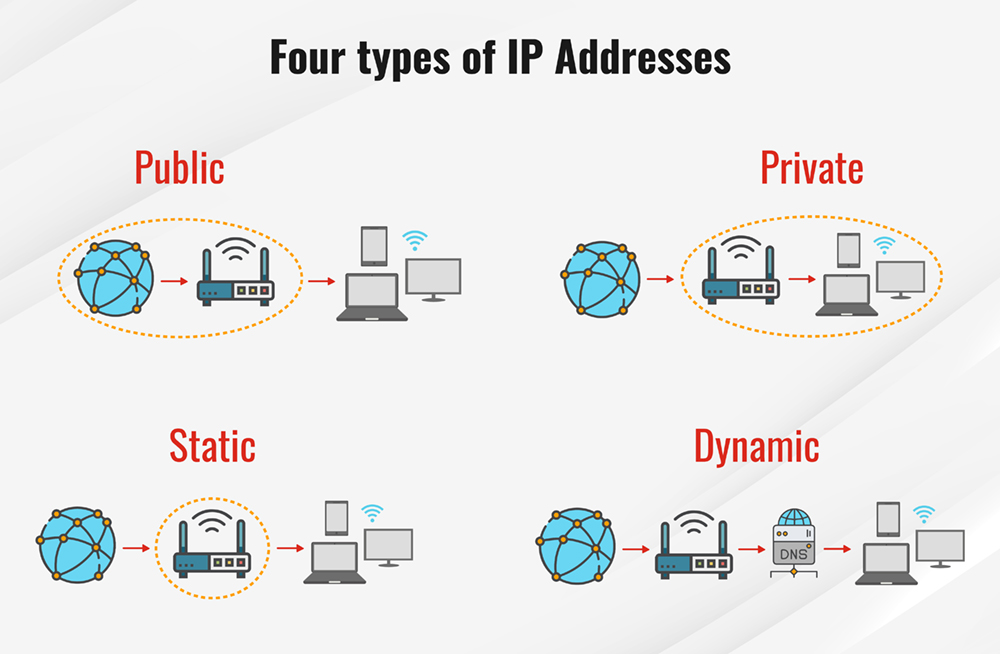
Public vs. Private IP Addresses
Public IP Address
A public IP is your identity on the internet. It is unique, assigned by your ISP, and visible to websites and services. Since it’s exposed to the web, devices with public IPs should always use firewalls and security protections.
Private IP Address
A private IP is used inside a home, office, or local network. It allows multiple devices to connect to the same router and share one public IP when accessing the internet.