
Router Passwords
Your Wi-Fi router has a simple login page where you can control all your internet settings. By typing a specific IP address into your browser, and entering the default username and password, you unlock the admin panel. This is called the router login. From here, you can rename your Wi-Fi, update passwords, manage devices, and strengthen your home network security.
Most routers today (TP-Link, Netgear, Huawei, ZTE, and others) use common login IPs such as 192.168.1.1, 192.168.0.1, or 10.0.0.1. If one doesn’t work, simply try another. Your internet provider may also customize these details. Knowing your router’s default login is especially helpful when you’re setting up your connection for the first time, or after a reset.
How to Access Router Admin Panel?
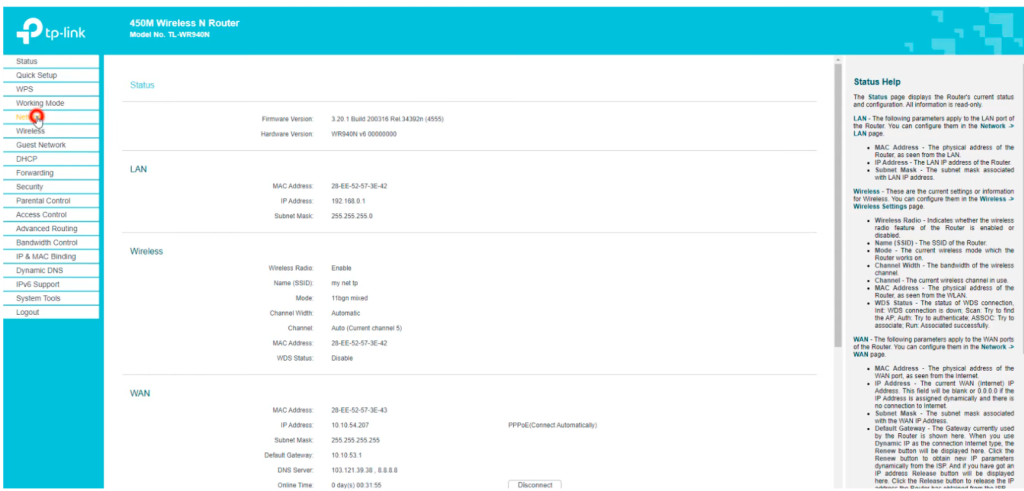
Accessing your router’s admin panel is simple and allows you to manage Wi-Fi settings, change passwords, and improve security. Follow these easy steps for a smooth login:
- Connect to Your Router Network – Make sure your device (phone, laptop, or PC) is connected to the router using Wi-Fi or an Ethernet cable.
- Open a Web Browser – Use Chrome, Safari, Firefox, or Edge for the best experience.
- Type the Router IP Address – Enter common IPs like 192.168.1.1, 192.168.0.1, or 10.0.0.1 in the browser’s address bar.
- Enter Login Credentials – Input the default username and password (commonly “admin/admin” or “admin/password”), unless changed before.
- Access the Admin Dashboard – Once logged in, you can view and edit settings such as Wi-Fi name, password, and connected devices.
- Update for Security – Change the default password immediately to a strong, unique one and save settings to secure your network.
Default Router Passwords by Brand (Updated 2025)
Use this table to quickly find the default router login IP, username, and password for popular brands and ISPs. If one IP does not work, try the alternatives listed.
|
Router Brand / ISP |
Default Login IP(s) |
Default Username |
Default Password |
|---|---|---|---|
|
TP-Link |
192.168.0.1, 192.168.1.1, tplinkwifi.net |
admin |
admin |
|
D-Link |
192.168.0.1, 192.168.1.1, dlinkrouter.local |
admin |
admin / (blank) |
|
Netgear |
192.168.1.1 |
admin |
password |
|
Huawei |
192.168.100.1, 192.168.3.1, 192.168.4.1, 192.168.8.1 |
telecomadmin / admin |
admintelecom / admin / Admin@huawei / [email protected] |
|
ZTE |
192.168.1.1, 192.168.0.1 |
admin |
admin / Web@0063 |
|
Linksys |
192.168.1.1 |
admin |
admin |
|
Asus |
192.168.1.1 |
admin |
admin |
|
Tenda |
192.168.0.1 |
admin |
admin |
|
Arris |
192.168.0.1 |
admin / cusadmin |
password |
|
Belkin |
192.168.2.1 |
admin |
admin |
|
Cisco |
192.168.1.1 |
cisco / admin |
cisco / admin |
|
Globe At Home |
192.168.254.254 |
user |
user / @l03e1t3 |
|
Telcel |
192.168.8.1 |
admin |
admin / Telcel / Telcel_Admin / 1111 |
|
Telenor |
192.168.8.1 |
admin |
admin |
|
Zong |
192.168.8.1 |
admin |
admin |
|
STC (Saudi Telecom) |
192.168.8.1 |
telecomadmin |
admintelecom |
|
Zain |
192.168.8.1 |
admin / user |
admin / zain / HuaweiUser |
|
Piso WiFi (LPB) |
10.0.0.1 |
admin / administrator |
123456789 / admin1234 |
|
TOTOLINK |
192.168.1.1, 192.168.0.1 |
admin |
admin |
|
Aterm |
192.168.10.1, aterm.me |
admin |
password |
|
Comtrend |
192.168.0.1 |
admin |
admin |
|
Digicom |
192.168.1.254 |
admin |
michelangelo |
|
Subisu |
192.168.1.254 |
AdminGPON |
ALC#FGU |